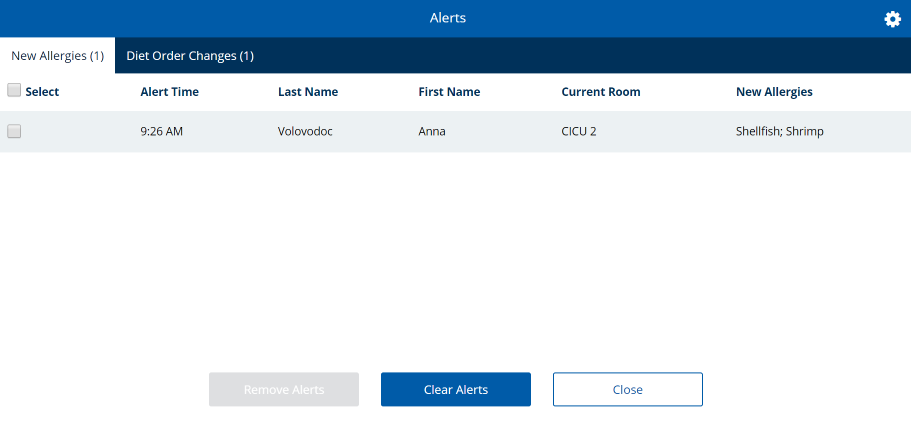
Alerts
As your facility administers patrons in Hospitality Suite, certain tasks or actions will create alerts to notify staff of major changes to patron information. Much like the Alert Monitor in Hospitality Suite, alerts are displayed for the following events, based on the modules your facility has. Available alerts are described in the following table:
| Name | Occurs When ... | Required Add-on Module |
|---|---|---|
| Admission | A new patron is admitted. | N/A |
| Allergy | A new allergy is assigned to a patron. | N/A |
| Diet Order Cancel | A patron's existing diet order is canceled. | N/A |
| Diet Order Change | A patron's diet order is replaced by a new diet order. | N/A |
| Diet Order Change - Advance Delivery | A patron's diet order change will affect a future scheduled delivery that was already set up. | N/A |
| Discharge | A patron has been set to be discharged. | N/A |
| Guest Tray Digital Menu Selections | A guest tray was ordered using TouchPoint Dining. | TouchPoint Dining |
| Patron Tray Digital Menu Selections | A patron tray was ordered using TouchPoint Dining. | TouchPoint Dining |
| Room Service Manager Exception | An exception was generated by the Room Service Manager in Hospitality Suite. | Room Service (HS module) |
| Room Service Manager Status | There was a change in the status of Room Service Manager. | Room Service (HS module) |
| Room Transfer | A patron was transferred to a different room location. | N/A |
| Tray Delivery Past Due | A patron's tray delivery is tracked as late through Tray InMotion. | Tray InMotion |
| Tray Delivery Warning | A warning/exception was generated by Tray InMotion related to a patron tray (for example, wrong patron scanned). | Tray InMotion |
You can customize which alerts appear for you in the application. Whenever a new alert is available, the counter on the alerts icon  (if turned on) will increase. You can clear alerts in the Alerts dialog to remove alerts that you have seen. If you click a row in the Alerts dialog, the record opens for the patron with the alert.
Note: Clearing alerts will only clear alerts for your user. Other users will still receive and be able to review those same alerts.