Selecting the Publishing Groups to Display in Menus
You can select the publishing groups from Hospitality Suite that will display on the menu as menu categories. Selected publishing groups will be displayed for all menu types that are used in the application. If a publishing group is not selected, any recipes assigned to the publishing group will not appear on any menus.
In addition, you can select in these settings an icon to display for each menu category in the application.
To select the publishing groups to display in menus:
- On the Saved Searches page, in the top-right corner, click
 . The Global Settings dialog opens.
 - Click to expand Publishing Groups to Display on Menu Page.
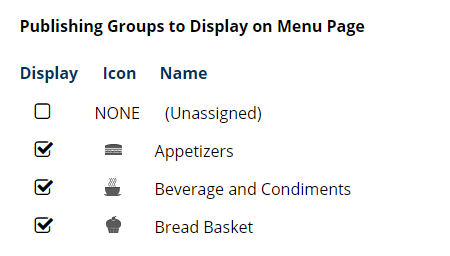
- Click to select each publishing group you want to display in the application.
- Click to clear each publishing group you do not want to display in the application.
- If you want to change an icon for a publishing group, continue as follows:
- Click NONE or the assigned icon for the publishing group. The Choose icon dialog appears.
- Select the icon you want to display. The dialog closes and the icon applies.
- Click Save.